
Installation Guide, Third Edition - HP rp5400 Family of Servers


Cabling and Power-Up
GSP Configurable Parameters
Chapter 3
76
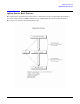
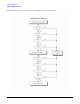
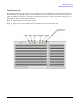
Return the GSP to Default Configurations
The Default Configuration (dc) command is used to reset all or some of the GSP values to the default values.
To return GSP values to default configurations, perform the following steps:
1. Access the GSP with the ctrl+b entry.
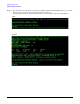
2. At the GSP prompt, enter the Default Configuration (dc) command:
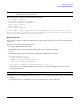
GSP> dc
3. Follow the prompts for the dc command, and be sure to have the change information available.
CAUTION When the Security configuration is reset, all users are removed, including the GSP
administrator. It also disables the remote. Remote must be re-enabled through the main
console using the Enable Remote (er) command.