
Carrier Grade Addendum - rp5400 Series of Servers


Chapter 2
Removal and Replace Procedures
Removing and Installing the Diffuser Card
40
Step 6. Insert the Server from the Front
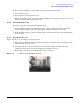
To return the server into the rack, perform the following steps:
1. Release the rail clips on each side of the server by pressing them.
2. Push the server into the rack until it stops.
3. Reinstall the four T-25 screws that fasten the server to the rack.
4. Reinstall the front Bezel.