
Carrier Grade Addendum - rp5400 Series of Servers


Chapter 2
Removal and Replace Procedures
Removing and Installing the Diffuser Card
36
Removing and Installing the Diffuser Card
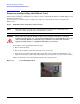
Under normal conditions, it should not be necessary to remove and install the diffuser card. The diffuser card
is installed at the factory.
If, however, there is a need to remove or replace the card, proceed as follows to remove and replace the
diffuser card.
Step 1. Extend the server out the front of the enclosure
NOTE Ensure that there is enough space, approximately 1.5 meters (4.5 ft.) at the front of the
enclosure to fully extend the server out the front to service it.
WARNING Ensure that all required anti-tip features, front and rear anti-tip feet, adequate
ballast properly placed, etc., are properly installed prior to extending the server out
of the enclosure. Failure to follow these precautions can result in the enclosure
tipping causing damage to equipment and injury to personnel.
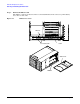
To extend the server, perform the following steps:
1. Remove the front Bezel.
2. Remove the four T-25 screws that fasten the server to the rack.
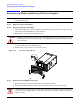
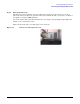
3. Grasp the server chassis and slowly pull forward. The server is fully extended when the rail
clips are locked in place. When fully extended, the top and side service bays are fully accessible.
Figure 2-5 shows the server extended and indicates the rail clip location.
Figure 2-5 Server Fully Extended