
User Service Guide, Fifth Edition - HP 9000 rp4410/4440


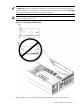

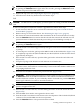


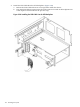

Figure 3-35 Slider Gate Latch
6. If the PCI/PCI-X card is full size, close the slider gate latch to secure the end of the card.
(Figure 3-35)
7. Push the MRL down until it seats against the chassis wall.
8. To capture the PCI/PCI-X card and MRL into the closed position, turn the PCI/PCI-X card
latch to the closed position.
9. Press the Attention button . The power LED starts to blink. Wait until the power LED goes
from blinking to steady on.
94 Installing the System