
User Service Guide, Fifth Edition - HP 9000 rp4410/4440

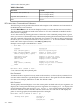
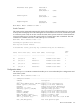




Table B-2 lists the boot paths.
Table B-2 Boot Paths
Boot PathBoot Source
0/1/1/0.0.0 (Simplex Mode)
0/1/1/1.0.0 (Duplex Mode)
Bottom Disk – Slot 1 (SCSI ID = 0)
0/1/1/0.1.0 (Duplex Mode)Top Disk – Slot 2 (SCSI ID = 1)
0/0/3/0.0DVD
BCH Main Menu Commands and Submenus
The following sections provide information and examples of the submenus and commands in
the BCH firmware user interface.
The BCH Main Menu is the first menu displayed when you enter the firmware user interface.
The other menus available are listed in this menu. To view the commands available from this
menu, enter DI (display).
Access other menus by entering the name of the menu at the command prompt. From a given
menu, you can run a command from any other menu by entering the menu name that is associated
with the command, followed by the command. For example, to run the TI (time) command (in
the COnfiguration menu) from the Main Menu, enter co ti. To see all available commands
listed under their respective menus, enter HE (help) MA (main).
Example screen output of the BCH Main Menu:
---- Main Menu ---------------------------------------------------------------
Command Description
------- -----------
BOot [PRI|ALT|<path>] Boot from specified path
* PAth [PRI|ALT|CON|KEY] [<path>] Display or modify a path
SEArch [DIsplay|IPL] [<path>] Search for boot devices
COnfiguration menu Displays or sets boot values
INformation menu Displays hardware information
SERvice menu Displays service commands
DIsplay Redisplay the current menu
HElp [<menu>|<command>] Display help for menu or command
RESET Restart the system
----
Main Menu: Enter command or menu >
* You cannot modify the keyboard path.
Boot Command
To initiate the boot sequence from any menu in the interface, use the BO (boot) command. You
can enter either a default or specified path to the boot device. This path must be the definition
of a device, for example, FWSCSI.6.0 or PRI. The default is PRI.
Path Command
The PA (path) command displays or sets the current paths. Invoked with only one argument, PA
displays the current path of the entity passed as argument. For example, path alt displays the
current alternative boot path, and path pri fwscsi.6.0 sets up the primary boot path as
the device attached to SCSI controller with ID 6 and LUN 0. You can also set and display the
paths of console (graphics/serial) and keyboard. For example:
Main Menu: Enter command or menu > pa
Primary boot path: intscsia.1
0/1/1/0.1
0/01/01/0.1 (hex)
236 Utilities