
User Service Guide, Fifth Edition - HP 9000 rp4410/4440


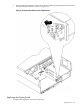


3. To remove the DVD drive from the chassis, pull it straight out of the server.
Figure 6-54 DVD Drive Removal and Replacement
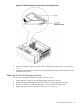
Replacing a DVD Drive
To replace a DVD drive, follow these steps:
1. Grasp the front of the DVD drive and squeeze the locking tab.
2. Push the drive straight into the drive bay until the locking tab clicks into place.
3. Replace the front bezel. See “Replacing the Front Bezel” (page 152).
DVD Drive 223