
User Service Guide, Fifth Edition - HP 9000 rp4410/4440




1. If rack-mounted, slide the server out of the rack until it stops. See “Accessing a Rack-Mounted
Server” (page 149).
2. Remove the cable management arm from the rack slide nearest the power supplies. The
cable management arm does not need to be completely removed but moved just enough to
enable access to the power supplies.
3. Remove the power cord plug from the power receptacle.
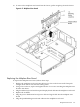
4. Loosen the captive thumbscrew located at the top left of the power supply.
5. Grasp the handle and pull the power supply out of the server.
Figure 6-52 Hot-Swappable Power Supply Removal and Replacement
Replacing a Hot-Swappable Power Supply
1. Supporting the power supply with both hands, slide it into the empty slot until it plugs into
the socket on the internal power distribution board. Hand-tighten the thumbscrew.
2. Install the power cord into the power supply socket.
3. Apply power to the new power supply. The LED immediately turns on.
Hot-Swappable Power Supplies 219