
User Service Guide, Fifth Edition - HP 9000 rp4410/4440


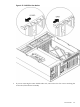
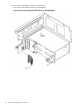
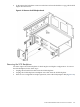



1. Align the bracket tabs with the slots on the side of the disk drive cage.
Figure 6-37 Aligning the Bracket Tabs on the SCSI Duplex Board
2. Press the bracket against the disk drive cage until the bracket locks into place.
3. Align the connector of the duplex board with the connector on the SCSI backplane.
4. Press the board connector into the backplane connector.
5. Plug the SCSI cable B connector into the SCSI connector located on the backplane next to
the duplex board (Figure 6-33 (page 196)).
6. Connect the other end of SCSI cable B to the SCSI B channel connector on the SCSI adapter
board.
200 Removing and Replacing Components