
User Service Guide, Fifth Edition - HP 9000 rp4410/4440


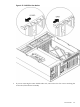
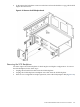



NOTE: The SCSI jumper cable bridges the two SCSI connectors on the SCSI backplane
when the server is configured for simplex operation. The SCSI jumper cable is not installed
in duplex configurations.
Figure 6-35 Remove the SCSI Backplane Jumper Cable
4. Remove the disk drives. See “Removing a Hot-Pluggable Disk Drive” (page 212).
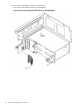
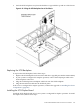
5. To unlatch the SCSI backplane from the hard disk cage, turn the swivel latch on top of the
hard disk drive cage.
6. Grasp the top edge of the SCSI backplane and pull up until it releases from the keyway slots
on the back of the disk drive cage.
198 Removing and Replacing Components