
User Service Guide, Fifth Edition - HP 9000 rp4410/4440


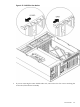
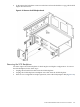



2. To disconnect the backplane connector and release it from the disk drive cage, pull the SCSI
duplex board forward.
Figure 6-34 Remove the SCSI Duplex Board
Removing the SCSI Backplane
You must replace the SCSI backplane for both simplex and duplex configurations. To remove
the SCSI backplane, follow these steps:
1. Unplug the internal SCSI cables from the SCSI backplane.
2. Unplug the SCSI backplane-to-midplane riser cable from the SCSI backplane.
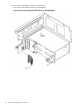
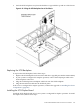
3. If the server is configured for simplex operation, remove the SCSI Jumper Cable (Figure 6-35).
U320 SCSI Enablement and Conversion Procedures 197