
User Service Guide, Fifth Edition - HP 9000 rp4410/4440
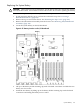


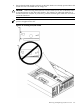
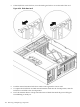

Table 6-6 PCI I/O Hardware Paths
PCI Bus AddressHP-UX PathMapper PathPCI Card Functionality
0x00-0x1F0/0/2/00/0/2/0USB Port 1
0x00-0x1F0/0/2/10/0/2/1USB Port 2
0x00-0x1F0/0/3/0.0.00/0/3/0.0.0DVD Drive
0x00-0x1F0/0/3/00/0/3/0IDE Controller
0x20-0x3F0/1/1/0.0.00/1/1/0.0.0Internal SCSI - Slot 1 simplex configuration
0x20-0x3F0/1/1/0.0.00/1/1/0.0.0Internal SCSI - Slot 1 duplex configuration
0x20-0x3F0/1/1/0.1.00/1/1/0.1.0Internal SCSI - Slot 2
0x20-0x3F0/1/1/00/1/1/0PCI Slot 1 - Channel A SCSI
0x20-0x3F0/1/1/10/1/1/1PCI Slot 1 - Channel B SCSI
0x20-0x3F0/1/1/1.x.y0/1/1/1.x.yPCI Slot 1 - Channel B external SCSI
0x20-0x3F01/2/00/1/2/0PCI Slot 2 - GigaBit LAN Port A
0x20-0x3F0/1/2/10/1/2/1PCI Slot 2 - GigaBit LAN Port B
0x80-0x9F0/4/10/4/1PCI Slot 3
0x80-0x9F0/4/20/4/2PCI Slot 4
0xA0-0xBF0/5/10/5/1PCI Slot 5
0xA0-0xBF0/5/20/5/2PCI Slot 6
0x40-0x7F0/2/10/2/1PCI Slot 7
0xC0-0xFF0/6/10/6/1PCI Slot 8
0x00-0x1F0/0/1/00/0/1/0UPS Communications Controller
0x00-0x1F0/0/1/10/0/1/1Local/Remote Serial Controller
OLA
Before installing a PCI/PCI-X card, ensure that the proper drivers for that PCI/PCI-X card are
installed.
NOTE: If you are installing the Graphics Kit A6150B, use slots 3-8. However, do not install the
included USB card. The server currently supports USB and the ports are already located on the
rear of the server.
If you are installing the RAID card A7143A, you must install it into slot 8. If you install this card
in any other slot, it interferes with the manual retention latch (MRL) on the OLX divider in the
next slot. Because of this interference, you can install only two RAID cards in the system in slot
1 and slot 8.
To add a PCI/PCI-X card into an empty slot, follow these steps:
1. If rack-mounted, slide the server out from the rack until it stops. See “Accessing a
Rack-Mounted Server” (page 149).
2. Remove the top cover from the chassis. See “Removing the Top Cover” (page 153).
Removing and Replacing PCI/PCI-X Cards 185