
User Service Guide, Fifth Edition - HP 9000 rp4410/4440
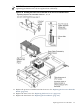

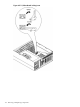


1. Before installing the replacement I/O baseboard, check the dipswitch S5102 located on top
of the I/O baseboard. Dipswitch bit 1 must be in the Off position to disable the onboard
Radeon graphics chip. If you do not disable the Radeon graphics chip, it appears as
“unknown-unclaimed” in the ioscan output.
Figure 6-23 S5102 Dipswitch Setting
NOTE: The I/O baseboard is large. Use care when sliding it into the server chassis.
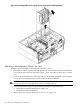
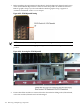
2. To disable the on-board Radeon graphics chip, set the S5102, #1 VGA dipswitch to the OFF
position.
Figure 6-24 Accessing the S5102 Dipswitch
3. Ensure that all fan modules are removed from the chassis before sliding in the I/O baseboard,
or the fans and the I/O baseboard can be damaged.
178 Removing and Replacing Components