
User Service Guide, Fifth Edition - HP 9000 rp4410/4440
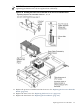

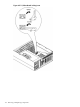

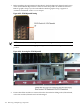

9. Slide the I/O baseboard assembly all the way to the rear until free from the chassis. To replace
the I/O baseboard with a new assembly, remove the cover from the VGA port at the rear of
the I/O board and save it to put onto the VGA port of the new baseboard. This VGA graphics
port is not supported in the HP 9000 rp4410 or rp4440 servers.
NOTE: The I/O baseboard assembly is large. Be careful when lifting it out of the server
chassis.
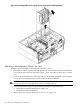
Figure 6-22 I/O Baseboard Removal
Replacing the I/O Baseboard Assembly
To replace the I/O baseboard assembly, follow these steps:
I/O Baseboard Assembly 177