
User Service Guide, Fifth Edition - HP 9000 rp4410/4440
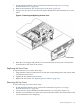
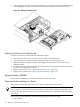



1. Align the DIMM with the socket located on the memory extender board. Align the notch in
the DIMM with the tab in the connector socket.
Figure 6-10 Inserting the DIMM into the Extender Board Connector Socket
2. Firmly and evenly push on each end of the DIMM until it seats in the connector socket.
Ensure that the extraction levers are in the closed position.
3. Replace the memory extender board in the chassis. See “Replacing the Memory Extender
Board” (page 156).
4. Replace the front cover. See “Replacing the Front Cover” (page 153).
5. Replace the front bezel. See “Replacing the Front Bezel” (page 152).
160 Removing and Replacing Components