
User Service Guide, Fifth Edition - HP 9000 rp4410/4440



Removing the Front Bezel
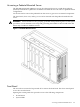
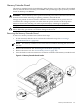
Remove the front bezel by grasping the outer edges of the front bezel and pulling straight out.
Figure 6-3 Removing and Replacing the Front Bezel
Replacing the Front Bezel
Replace the front bezel by pushing the front bezel straight into the chassis until it snaps into
place.
Front and Top Covers
CAUTION: Do not operate the server without the front and top covers in place. Operation of
the server without the front and top covers in place makes the server susceptible to electromagnetic
interference (EMI) and overheating problems that result in system failure.
Observe all electrostatic discharge (ESD) safety precautions before attempting this procedure.
Failure to follow ESD safety precautions can result in damage to the server.
NOTE: When the front or top cover is removed, the chassis fan units increase to high speed to
assist cooling. When the top cover is replaced at the end of the operation, the chassis fans return
to normal speed.
Removing the Front Cover
CAUTION: Power the server off before removing the front cover. All components accessible
behind the front cover are cold-swappable and require power to be off.
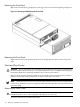
To remove the front cover, follow these steps:
152 Removing and Replacing Components