
User Service Guide, Fifth Edition - HP 9000 rp4410/4440

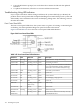
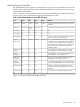
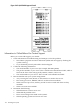


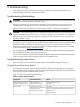


Figure 3-45 QuickFind Diagnostic Panel
Information to Collect Before You Contact Support
Before you contact HP support, you should:
1. Check information on troubleshooting and attempt to solve the problem.
• Note failure symptoms and error indications (LEDs and messages) by checking the
system event log.
• Try to determine precisely what did or did not happen.
2. Collect the following information:
• The model number of your server (for example, HP 9000 rp4440)
• The product number of your server. This is found on the identification label, which is
found at the front of the unit (typically A9956A, A9951A, and so on).
• The serial number of your server. This is found on the identification label.
3. Become familiar with your system configuration:
• Are you using the LAN, RS-232, or web interface to monitor the server?
• How many processors, DIMMs, and PCI cards have been installed?
• What versions of processor, memory, and PCI cards are used and where are they
installed?
• What accessories are installed?
4. Determine the following:
• Which firmware versions are in use?
• When did the problem start?
• Have recent changes been made to the system?
• Which operating system and version is in use?
124 Installing the System