
User Service Guide, Fifth Edition - HP 9000 rp4410/4440





QuickFind Diagnostic Panel LEDs
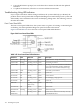
The QuickFind diagnostic panel is located under the top cover and is attached to the top of the
power supply cage. This panel contains LEDs that illuminate to show the status of associated
components and assemblies.
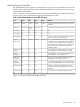
Table 3-22 lists the various QuickFind diagnostic panel LEDs and display combinations that you
may encounter, and recommends the appropriate maintenance action.
Table 3-22 QuickFind Diagnostic Panel LED Definitions
DetailsLED3LED2LED1LED 0Item
Check that recently installed items are correctly
installed.
Socket 3Socket 2Socket 1Socket 0Processor
Check that the indicated board is correctly seated.n/aI/O boardMemory
board
CPU boardSubsystem
n/an/an/an/an/aI/O VRM
n/an/an/an/an/aCPU VRM
Check for a fan that is not functioning. Look for
loose connections or missing items.
n/a210Fan module
The specified DIMM has failed, Reseat or replace
the memory board and DIMM. If all the LEDs for
a rank (0-7) are lit and the memory config error
LED is lit, then the DIMMs in the specified rank
are mismatched—review the information on
installing memory.
DIMM xDDIMM xCDIMM xBDIMM xAMemory
bank X (0-7)
The faulty power supply LED (located on the
power supply) is lit. Reseat the power supply.
n/an/an/aCheck power
supply
The DIMMs in a rank are mismatched. Rreview
the information on installing memory.
n/an/an/aMemory
config error
The processors are mismatched, Review the
information on installing processors.
n/an/an/aProcessor
config error
A required component(s) is not detected. Check
that recently installed items are correctly installed.
n/an/an/aMissing
component
Make sure nothing is blocking server airflow.
Check that recently installed items are correctly
installed.
n/an/an/aSystem temp
An event has occurred that requires attention.n/an/an/aCheck event
log
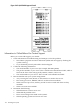
Figure 1-21 shows the QuickFind diagnostic panel.
Troubleshooting 123