
User Service Guide, Fifth Edition - HP 9000 rp4410/4440
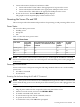

7. Start the operating system.
Powering On the Server Manually
NOTE: If the power restore feature is set to Always On through the iLO MP PR command,
the server automatically powers on to the full power state when the power cord is plugged in
to the server.
To manually power on the server, follow these steps:
1. Plug all power cables into the receptacles on the rear panel of the server.
2. To start the server, press the power button.
3. Start the operating system.
Powering Off the Server
Power off the server using the following methods if the server is in the standby or full power
state:
• iLO MP PC command
• Power button
Powering Off the Server Using the iLO MP PC Command
To power off the server using the iLO MP PC command, follow these steps:
1. Gracefully shut down the operating system.
2. Initiate a console session, and access the MP Main Menu.
3. To enable command mode, enter CM.
4. To use the remote power control command, enter PC.
5. To power off the server, enter OFF.
6. To confirm the action, enter YES when prompted.
CAUTION: The main DC voltage is now removed from the system; however, AC voltage
for standby power is still present in the server.
7. Unplug all power cables from the receptacles on the rear panel of the server.
Powering Off the Server Manually
To manually power off the server, follow these steps:
1. Gracefully shut down the operating system.
2. To power off the server, press the power button.
CAUTION: The main DC voltage is now removed from the system; however, AC voltage
for standby power is still present in the server.
3. Unplug all power cables from the receptacles on the rear panel of the server.
Booting the Operating System
This section covers procedures for booting and shutting down an operating system on the server.
Supported Operating System
The only supported operating system on the HP 9000 rp4410 and rp4440 servers is HP-UX 11i
Version 1 (and higher HP-UX versions that support PA-RISC systems).
116 Installing the System