
User Service Guide, Fifth Edition - HP 9000 rp4410/4440
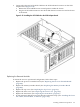
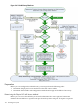

5. Connect the other end of the SCSI Cable B to the SCSI B channel connector on the SCSI
adapter board. (Figure 3-39)
a. Release the SCSI Cable B from its stowed position within the chassis.
b. Plug the SCSI Cable B connector into the SCSI B channel connector located at the rear
of the board.
Figure 3-39 Installing the SCSI Cable B to the SCSI Adapter Board
Replacing the Removed Modules
To return the server to operational configuration, follow these steps:
1. Replace the processor extender board. (See “Replacing the Processor Extender Board”
(page 84).)
2. Replace the memory extender board. (See “Replacing the Memory Extender Board”
(page 88).)
3. Replace the top cover. (See “Replacing the Top Cover” (page 66).)
4. Replace the front cover. (See “Replacing the Front Cover” (page 65).)
5. Replace the front bezel. (See “Replacing the Front Bezel” (page 64).)
6. If rack-mounted, slide the server back into the rack until it stops. (See “Installing the Server
Into a Rack, Non-HP Rack, or Pedestal” (page 102).)
Installing Additional Components 101