
Installation Guide, Sixth Edition - HP 9000 rp4410/rp4440




Installing the System
Installing Additional Components
Chapter 1
70
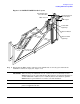
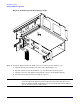
Figure 1-38 Installing SCSI Cable B to the SCSI Backplane
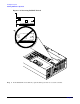
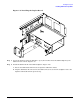
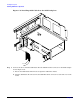
Step 5. Connect the other end of the SCSI Cable B to the SCSI B channel connector on the SCSI adapter
board. (Figure 1-39)
a. Release the SCSI Cable B from its stowed position within the chassis.
b. Plug the SCSI Cable B connector into the SCSI B channel connector located at the rear of the
board.