
Installation Guide, Sixth Edition - HP 9000 rp4410/rp4440




Installing the System
Installing Additional Components
Chapter 1
69
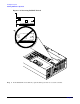
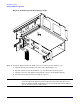
Figure 1-37 Installing the Duplex Board
Step 3. Secure the duplex board to the disk drive cage by the bracket and to the SCSI backplane by the
SCSI connector sockets. (Figure 1-37)
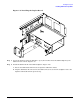
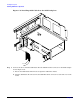
Step 4. Install the SCSI Cable B on the SCSI backplane. (Figure 1-38)
a. Release the SCSI Cable B from its stowed position within the chassis.
b. Plug the SCSI Cable B connector into the SCSI connector located on the backplane next to the
duplex board installed in the previous step.