
Installation Guide, Sixth Edition - HP 9000 rp4410/rp4440




Installing the System
Installing Additional Components
Chapter 1
45
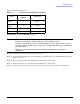
Table 1-7 lists the load sequence.
Removing the Processor Extender Board
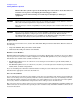
WARNING Ensure that the system is powered off and all power sources have been disconnected
from the server prior to removing the processor extender board.
Voltages are present at various locations within the server whenever an ac power
source is connected. This voltage is present even when the main power switch is in
the off position.
Failure to observe this warning can result in personal injury or damage to
equipment.
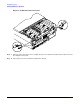
To remove the processor extender board, follow these steps:
Step 1. If rack-mounted, slide the server out from the rack until it stops. (See “Extend the Server from the
Rack” on page 22.)
Step 2. Remove the front bezel. (See “Removing the Front Bezel” on page 28.)
Step 3. Remove the front cover. (See “Removing the Front Cover” on page 29.)
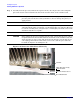
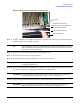
Step 4. Press the latch on each extraction lever located on each side of the processor extender board.
Table 1-7 Dual Processor Module Load Order
Server
Dual Processor
Module
Connector
rp4410 or
rp4440
1CPU0
rp4410 or
rp4440
2CPU1
rp4440 only 3 CPU2
rp4440 only 4 CPU3