
Installation Guide, Sixth Edition - HP 9000 rp4410/rp4440




Installing the System
Installing Additional Components
Chapter 1
42
Installing Hot-Pluggable Disk Drives
One additional hot-pluggable disk drive can be added to the server in slot 2. Always use low profile disk drives
(1 inch height) in the server.
To install a hot-pluggable disk drive, follow these steps:
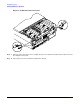
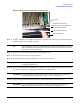
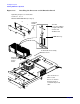
Step 1. Remove the volume filler from slot 2.
Figure 1-20 Volume Filler Installation in Slot 2
NOTE For cooling purposes, always leave the volume filler in slot 2 if you do not use a
second disk drive.
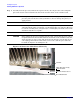
Step 2. Slide the hot-pluggable disk drive into slot 2 until it is seated.