
Installation Guide, Sixth Edition - HP 9000 rp4410/rp4440


Installing the System
Installing Additional Components
Chapter 1
39
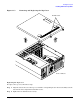
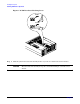
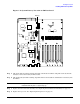
Figure 1-18 System Battery Location on I/O Baseboard
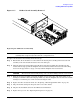
Step 5. Lift up the battery holder retaining clip with a flat-head screwdriver and push on the back of the
battery to remove the battery from its socket.
Step 6. Lift up the battery holder retaining clip with a flat-head screwdriver and slide the new battery into
the holder.
NOTE The positive terminal of the battery is designated by the plus (+) sign. The battery is
installed with the plus (+) sign facing up.
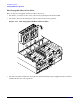
Step 7. Replace the I/O baseboard assembly. (See “Replacing the I/O Baseboard Assembly” on page 37.)
Step 8. Replace the top cover. (See “Replacing the Top Cover” on page 31.)
Battery