
Installation Guide, Sixth Edition - HP 9000 rp4410/rp4440


Installing the System
Installing Additional Components
Chapter 1
31
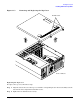
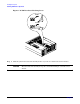
Figure 1-13 Removing and Replacing the Top Cover
Replacing the Top Cover
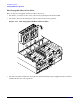
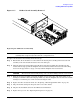
To replace the top cover, follow these steps:
Step 1. Align the tabs at the rear of the top cover with the corresponding slots in the chassis. Fully seat the
tabs into the slots and push forward until it seats.
Step 2. Tighten the two thumbscrews securely.
Rear of Chassis
Thumbscrews