
HP SC08Ge Host Bus Adapter Installation Guide


SAS BIOS configuration utility 11
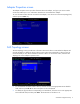
CAUTION: After a format is started it cannot be paused or cancelled.
To begin the format, press F.
The formatting procedure sets the sector size to 512 bytes, even if the drive was previously formatted to
another sector size. This is the only sector size that the SAS BIOS configuration utility supports on RAID
volumes.
Device Verify screen
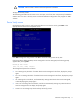
Use the Device Verify screen to verify a particular device. To access this screen, press Enter in the
appropriate field on the Device Properties screen.
Press Enter to begin the verify process. Press Esc to cancel the verify process at any time.
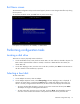
If the logical block addresses (LBAs) can be reassigned or must be reassigned, the following prompt
appears after pressing Enter:
Reassign the block?
(Yes, No, All, nonE, Cancel)
The reassignment options are as follows:
• Yes—Reassign only this block. If another block must be reassigned in the future, display the prompt
again.
• No—Do not reassign this block. If another block must be reassigned in the future, display the prompt
again.
• All—Reassign the current block, and automatically reassign other blocks that must be reassigned,
without displaying the prompt again.
• nonE—Do not reassign the current block, and do not automatically reassign any other blocks that
must be reassigned. Do not display the prompt again.
• Cancel—Do not reassign any blocks and stop the verify process.