
HP ProLiant XL220a Gen8 v2 Maintenance and Service Guide



Removal and replacement procedures 44
9.
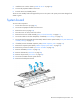
Grasp the processor by the edges, and then lift it out of the socket.
To install the processor:
CAUTION: THE PINS ON THE SYSTEM BOARD ARE VERY FRAGILE AND EASILY DAMAGED. To
avoid damage to the system board:
• Do not touch the processor socket contacts.
• Do not tilt or slide the processor when lowering the processor into the socket.
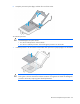
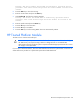
1. Install the processor. Use the notches on both sides of the processor to properly align it into the socket.
CAUTION: Be sure to close the processor socket retaining bracket before closing the processor
locking lever. The lever should close without resistance. Forcing the lever closed can damage the
processor and socket, requiring system board replacement.