
HP ProLiant XL220a Gen8 v2 Maintenance and Service Guide



Removal and replacement procedures 43
3.
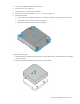
Disconnect all peripheral cables from the server.
4. Remove the server (on page 25).
5. Place the server on a flat, level work surface.
6. Remove the processor air baffle ("Processor air baffle" on page 28).
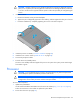
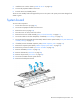
7. Remove the heatsink:
a. Loosen one pair of diagonally opposite screws halfway, and then loosen the other pair of screws.
b. Completely loosen all screws in the same sequence.
c. Remove the heatsink from the processor backplate.
WARNING: To reduce the risk of personal injury from hot surfaces, allow the heatsink to cool
before touching it.
WARNING: To reduce the risk of personal injury from hot surfaces, allow the drives and the
internal system components to cool before touching them.
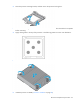
CAUTION: To avoid damage to the processor, do not touch the bottom of the processor,
especially the contact area.
CAUTION: The pins on the processor socket are very fragile. Any damage to them may require
replacing the system board.
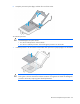
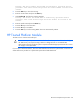
8. Open the processor locking lever, and then open the processor retaining bracket.