
HP ProLiant XL220a Gen8 v2 Maintenance and Service Guide





Removal and replacement procedures 38
8.
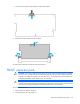
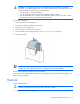
Disconnect the front panel LED board assembly cables.
9. Remove all drives ("Drive" on page 27).
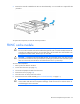
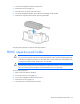
10. Remove the drive cage assembly.
To replace the component, reverse the removal procedure.
Front panel LED board assembly
To remove the component:
1. Back up all server data on the drive.
2. Power down the server (on page 25).
3. Disconnect all peripheral cables from the server.
4. Remove the server (on page 25).
5. Place the server on a flat, level work surface.