
HP ProLiant XL220a Gen8 v2 Maintenance and Service Guide





Removal and replacement procedures 32
6.
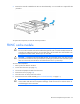
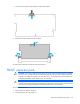
Remove the PCI riser board assembly. A T-10 screwdriver (for horizontal screws) and a T-15
screwdriver (for vertical screws) are required for this procedure.
To replace the component, reverse the removal procedure.
Controller
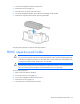
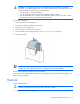
To remove the component:
1. Power down the server (on page 25).
2. Disconnect all peripheral cables from the server.
3. Remove the server (on page 25).
4. Place the server on a flat, level work surface.
5. Disconnect all cables connected to existing expansion boards.
6. Remove the PCI riser board assembly ("PCI riser board assembly" on page 31).