
HP ProLiant XL220a Gen8 v2 Maintenance and Service Guide





Removal and replacement procedures 31
2.
Disconnect all peripheral cables from the server.
3. Remove the server (on page 25).
4. Place the server on a flat, level work surface.
5. Remove the processor air baffle ("Processor air baffle" on page 28).
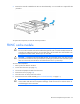
6. Remove the DIMM.
To replace the component, reverse the removal procedure.
PCI riser board assembly
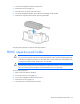
To remove the component:
1. Power down the server (on page 25).
2. Disconnect all peripheral cables from the server.
3. Remove the server (on page 25).
4. Place the server on a flat, level work surface.
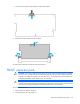
5. Disconnect all cables connected to existing expansion boards.
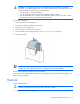
IMPORTANT: Both T-10 and T-15 screws are required for this procedure. When replacing the
component, be sure to install the screws in the proper location. Failure to do so will cause the
server to not install properly into the chassis.