
HP ProLiant XL220a Gen8 v2 Maintenance and Service Guide







Removal and replacement procedures 28
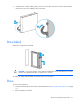
3.
Remove the drive.
To replace the drive, slide the drive into the bay until it is fully seated, and then close the latch handle to lock
the drive in the bay.
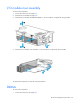
Processor air baffle
To remove the component:
1. Power down the server (on page 25).
2. Disconnect all peripheral cables from the server.
3. Remove the server (on page 25).
4. Place the server on a flat, level work surface.