
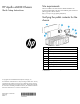
HP Apollo a6000 Chassis Quick Setup Instructions
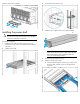

Installing an I/O module
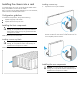
Install the component as indicated.
Installing a system fan
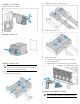
Installing a power cage
CAUTION: To prevent damage to the component, power
down the chassis and disconnect all power cords before
removing or installing the component.
To install the component:
1. Remove the power cage cover.
2. Install the power cables in the power cage.
3. Install the power cage cover.
4. Install the power cage.
a. Insert the power cage into the correct power cage bay.
b. Close the release lever.
c. Tighten the screw to secure the power cage to the chassis.
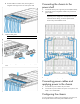
Installing the management module
IMPORTANT: Always complete the installation of both
power cages before installing the management module.