
Linux on HP ProLiant WS460c Gen8 Workstation Blade with WS460c0 Graphics Expansion Blade Administrator Guide

Using Red Hat Enterprise Linux on the workstation blade 15
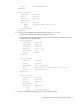
If you are using a WS460c Gen8 workstation blade, edit the xorg.MATROX file.
If you are running Red Hat Enterprise Linux 6, make the following changes, making sure you
customize the BusID line in the Device section using the PCI ID you recorded earlier:
Section "Monitor"
Identifier "Monitor0"
VendorName "Unknown"
ModelName "Unknown"
HorizSync 28.0 - 33.0
VertRefresh 43.0 - 72.0
Option "DPMS"
EndSection
Section "Device"
Identifier "Device0"
Driver "mga"
VendorName "Matrox Graphics"
BusID "PCI:01:00:1" ##PCI ID for your MATROX card
Option "UseEDID""false"
EndSection
Section "Screen"
Identifier "Screen0"
Device "Device0"
Monitor "Monitor0"
DefaultDepth 24
SubSection "Display"
Depth 24
Modes "1024x768" "800x600"
EndSubSection
15. Save a backup of the old xorg.conf file. After you complete this step, the xorg.conf file has been
deleted.
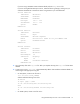
16. Create a new script in /etc/init.d that automatically detects what mode the workstation blade is in
and changes to the appropriate xorg file:
o On G6 systems, create a new file with vi:
# vi /etc/init.d/VID_CHANGE
and then add the following lines to file:
#!/bin/sh
if lspci |grep '';then
ln -sf /etc/X11/xorg.ATI /etc/X11/xorg.conf
else
ln -sf /etc/X11/xorg.NVIDIA /etc/X11/xorg.conf
fi
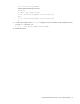
o On Gen8 systems, create a new file with vi: