
HP ProLiant WS460c Gen8 Workstation Blade with WS460c Graphics Expansion Blade Maintenance and Service Guide
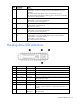


Component identification 97
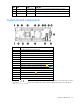
System maintenance switch
Position Default Function
S1
Off Off = HP iLO security is enabled.
On = HP iLO security is disabled.
S2
Off
Off = System configuration can be
changed.
On = System configuration is locked.
S3
Off Reserved
S4
Off Reserved
S5
Off Off = Power-on password is enabled.
On = Power-on password is disabled.
S6
Off Off = No function
On = ROM reads system configuration
as invalid.
S7
— Reserved
S8
— Reserved
S9
— Reserved
S10
— Reserved
S11
— Reserved
S12
— Reserved
To access the redundant ROM, set S1, S5, and S6 to on.
For the graphics expansion blade, make sure that S9 is in the ON position.
When the system maintenance switch position 6 is set to the On position, the system is prepared to erase all
system configuration settings from both CMOS and NVRAM.
CAUTION: Clearing CMOS and/or NVRAM deletes configuration information. Be sure to
properly configure the server or data loss could occur.
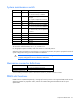
Mezzanine connector definitions
Item PCIe
Mezzanine connector 1
x16, Type A mezzanine card only
Mezzanine connector 2*
x16, Type A or B mezzanine card
*When installing a mezzanine option on mezzanine connector 2, processor 2 must be installed.
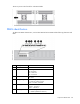
DIMM slot locations
DIMM slots are numbered sequentially (1 through 8) for each processor. The supported AMP modes use the
alpha assignments for population order, and the slot numbers designate the DIMM slot ID for spare
replacement.