
HP ProLiant WS460c Gen8 Workstation Blade with WS460c Graphics Expansion Blade Maintenance and Service Guide

Removal and replacement procedures 85
16.
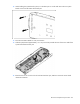
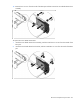
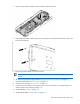
Remove the T-10 screw from the inside of the base pan and then remove the server blade release lever
assembly.
To replace the server blade release lever:
1. Install the server blade release lever assembly, and then install the T-10 screws from the outside of the
base pan.
2. Install the server blade release lever bracket, and then install the T-10 screw from the inside of the base
pan.