
HP ProLiant WS460c Gen8 Workstation Blade with WS460c Graphics Expansion Blade Maintenance and Service Guide

Removal and replacement procedures 77
3.
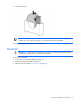
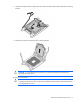
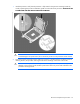
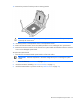
Press and hold the processor retaining bracket in place, and then close each processor locking lever.
Press only in the area indicated on the processor retaining bracket.
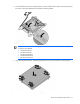
IMPORTANT: Always install the high performance heatsink when any of the following
processors are installed:
• Intel Xeon E5-2643
• Intel Xeon E5-2690
• Intel Xeon E5-2667v2
• Intel Xeon E5-2643v2
• Intel Xeon E5-2637v2
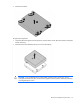
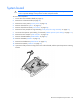
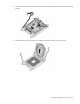
4. Align and install the heatsink. Alternate tightening the screws until the heatsink is seated properly.
5. Install the access panel ("Access panel" on page 28).