
HP ProLiant WS460c Gen8 Workstation Blade with WS460c Graphics Expansion Blade Maintenance and Service Guide


Removal and replacement procedures 63
o
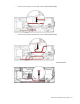
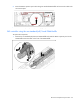
When connected to the mezzanine option
Replacing the FBWC capacitor pack and cable
Depending on the workstation blade model, your workstation blade may have standard DIMM baffles or the
3 rank DIMM baffles installed. Determine which DIMM baffles are installed on your workstation blade, and
then route the cables as indicated:
• SAS controller using the standard DIMM baffle (on page 64)
Supports the FBWC capacitor pack with either the 12-inch or 24-inch cable
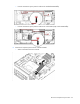
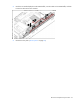
• Mezzanine option using the standard DIMM baffle (on page 65)
Supports only the FBWC capacitor pack with the 24-inch cable
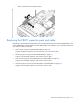
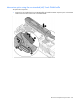
• SAS controller using the non-standard (tall) 3-rank DIMM baffle (on page 66)
Supports only the FBWC capacitor pack with the 24-inch cable
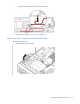
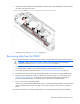
• Mezzanine option using the non-standard (tall) 3-rank DIMM baffle (on page 68)
Supports only the FBWC capacitor pack with the 24-inch cable