
HP ProLiant WS460c Gen8 Workstation Blade with WS460c Graphics Expansion Blade Maintenance and Service Guide

Removal and replacement procedures 59
3.
Remove the access panel ("Access panel" on page 28).
4. Disconnect the capacitor pack cabling, if connected ("FBWC capacitor pack cabling" on page 101).
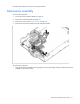
CAUTION: Always remove the SAS controller before removing the drive cage.
CAUTION: Always be sure that both captive screws are disengaged before removing the SAS
controller. Failure to disengage the screws may result in damage to the SAS controller or the SAS
backplane and bracket.
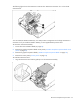
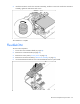
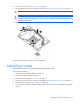
5. Remove the SAS controller.
To replace the component, reverse the removal procedure.
NAND flash module
The NAND flash module only provides data backup for the FBWC option.
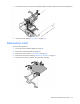
To remove the component:
1. Power down the workstation blade (on page 26).
2. Remove the workstation blade (on page 28).
3. Remove the access panel ("Access panel" on page 28).
4. Disconnect the capacitor pack cabling, if connected ("FBWC capacitor pack cabling" on page 101).
5. Remove the SAS controller ("SAS controller" on page 58).
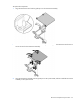
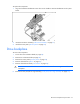
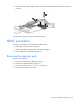
6. Lift the handle on the SAS controller, and then remove the T-15 screw from the NAND flash module
bracket.