
HP ProLiant WS460c Gen8 Workstation Blade with WS460c Graphics Expansion Blade Maintenance and Service Guide

Removal and replacement procedures 55
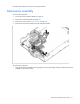
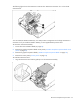
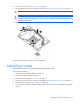
The following figure shows the mezzanine connector slots. Mezzanine connector slot 1 is the shorter
mezzanine slot.
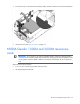
You can install the Quadro 3000M only in a dual processor configuration on the longer mezzanine 2
connector slot. If you install the Quadro 3000M, you must populate both processor slots.
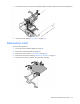
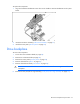
To access the mezzanine assembly:
1. Power down the workstation blade (on page 26).
2. Remove the graphics expansion blade access panel ("WS460c Graphics Expansion Blade access
panel" on page 29).
3. Remove the graphics expansion blade ("WS460c Graphics Expansion Blade" on page 29).
4. Remove the access panel ("Access panel" on page 28).
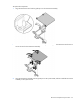
To install the mezzanine card:
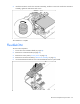
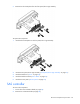
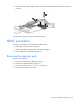
1. Align the mezzanine card with the guide pins on the mezzanine assembly.