
HP ProLiant WS460c Gen8 Workstation Blade with WS460c Graphics Expansion Blade Maintenance and Service Guide

Removal and replacement procedures 47
3.
Determine the status of the drive from the drive LED definitions ("Hot-plug drive LED definitions" on page
95).
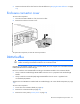
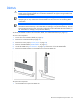
Enclosure connector cover
To remove the component:
1. Place the workstation blade on a flat, level work surface.
2. Remove the enclosure connector cover.
To replace the component, reverse the removal procedure.
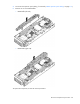
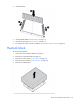
DIMM baffles
CAUTION:
To prevent improper cooling and thermal damage, always install the correct DIMM
baffles according to the DIMMs installed on the workstation blade.
Depending on the DIMMs installed on the workstation blade, this server supports one of two different DIMM
baffles (standard and non-standard height).
Be sure to install the correct DIMM baffle according to the DIMMs installed on the workstation blade:
• Always install the standard-height DIMM baffles when the server is populated with standard-height
DIMMs.
• Always install the non-standard (tall) height DIMM baffles when the server is populated with
non-standard (tall) DIMMs.
To determine which DIMMs are standard and non-standard height, see "Server blade components (on page
15)."
To remove the component:
1. Power down the workstation blade (on page 26).
2. Remove the workstation blade (on page 28).
3. Remove the access panel ("Access panel" on page 28).