
HP ProLiant WS460c Gen8 Workstation Blade with WS460c Graphics Expansion Blade Maintenance and Service Guide

Removal and replacement procedures 36
5.
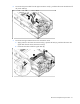
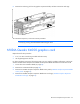
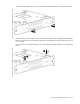
Disconnect any power cables from the graphics card, disconnect the retaining screws, and then remove
the graphics card cover from the top slot of the card cage.
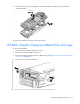
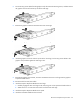
6. Remove the graphics card from the bottom slot of the card cage.
7. Install the new graphics card to the bottom slot of the card cage.
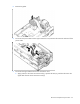
8. Install the graphics card cover into the top slot of the card cage, connect any power cables to the
graphics card, and then tighten the retaining screws.
9. Reinstall the graphics card retainer, and then reinstall the entire PCIe card cage into the graphics
expansion blade chassis.
10. Reconnect the four PCIe/SAS cables.
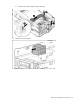
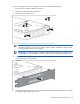
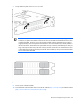
11. Install the Graphics Expansion Blade PCIe card cage:
a. Carefully engage the PCIe card cage to the anchoring pins on the expansion blade enclosure.
b. Attach the two T-15 screws that secure the front of the PCIe card cage.
12. Install the Graphics Expansion Blade access panel.
13. Install the workstation blade into the enclosure.