
HP ProLiant WS460c Gen8 Workstation Blade with WS460c Graphics Expansion Blade Maintenance and Service Guide

Removal and replacement procedures 28
b.
On the Virtual Power menu, to initiate a controlled shutdown of applications and the OS, select
Momentary Press, or to initiate an emergency shutdown of applications and the OS, select Press
and Hold.
Remove the workstation blade
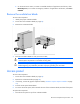
To remove the component:
1. Identify the proper workstation blade.
2. Power down the workstation blade (on page 26).
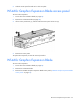
3. Remove the workstation blade.
4. Place the workstation blade on a flat, level work surface.
WARNING: To reduce the risk of personal injury from hot surfaces, allow the drives and the
internal system components to cool before touching them.
CAUTION:
To prevent damage to electrical components, properly ground the workstation blade
before beginning any installation procedure. Improper grounding can cause ESD.
Access panel
To remove the component:
1. Power down the workstation blade (on page 26).
2. Remove the workstation blade (on page 28).
3. If necessary, remove the graphics expansion blade ("WS460c Graphics Expansion Blade" on page
29).
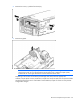
4. Press the access panel release button.
5. To remove the access panel, slide it towards the rear of the workstation blade, and then lift the panel.
To replace the component:
1. Place the access panel on top of the workstation blade.