
HP ProLiant WS460c Gen8 Workstation Blade with WS460c Graphics Expansion Blade Maintenance and Service Guide


Cabling 103
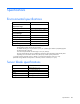
Accessing a server blade with local KVM
For this configuration, a USB hub is not necessary. To connect additional devices, use a USB hub.
CAUTION:
Before disconnecting the SUV cable from the connector, always squeeze the release
buttons on the sides of the connector. Failure to do so can result in damage to the equipment.
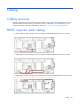
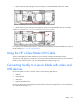
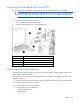
1. Open the serial label pull tab and connect the HP c-Class Blade SUV Cable to the workstation blade.
2. Connect the video connector to a monitor.
3. Connect a USB mouse to one USB connector.
4. Connect a USB keyboard to the second USB connector.
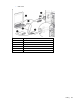
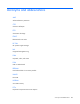
Item Description
1
Monitor
2
USB mouse
3
USB keyboard
4
HP c-Class Blade SUV Cable
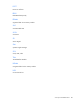
Accessing local media devices
Use the following configuration when configuring a workstation blade or loading software updates and
patches from a USB CD/DVD-ROM.
Use a USB hub when connecting a USB CD-ROM drive to the workstation blade. The USB hub provides
additional connections.
1. Open the serial label pull tab and connect the HP c-Class Blade SUV cable to the workstation blade.
2. Connect the video connector to a monitor.
3. Connect a USB hub to one USB connector.
4. Connect the following to the USB hub:
o USB CD/DVD-ROM drive
o USB keyboard