
HP ProLiant WS460c Gen8 Workstation Blade with WS460c Graphics Expansion Blade CE Installation Guide
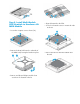

Step 5 Install Multi-GPU MXM
Module into the Multi-GPU PCA
• Install assembly (MXM with heat sink) into
MXM connector on HP MultiGPU carrier
PCA.
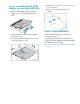
• Seat the heatsink assembly into the graphic
board slot shown.
• Secure the heatsink assembly with two screws
removed in previous step.
• Reinstall the clear air flow cover using the 3 screws
to secure in
place.
• Attach 2 screws from back of tray into
heatsink.
Step 6. More Information
For more detailed setup and configuration
information as well as
regulatory, safety, and environmental notices,
see the HP ProLiant WS460c Workstation Blade
User Guide on the HP website
(http://www.hp.com/go/bladesystem/documen
tation).
