
HP ProLiant WS460c Gen8 Workstation Blade with WS460c Graphics Expansion Blade CE Installation Guide

Sign up for updates
hp.com/go/getupdated
Share with colleagues
Rate this document
© Copyright 2014 Hewlett-Packard Development Company, L.P. The information contained herein is subject to change without notice. The only warranties for
HP products and services are set forth in the express warranty statements accompanying such products and services. Nothing herein should be construed as
constituting an additional warranty. HP shall not be liable for technical or editorial errors or omissions contained herein.
Part Number 784068-001, May 2014
Step 4. Install Multi-Module
GPU Heatsink to Hardware Kit
MXM Module
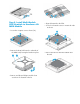
• Loosen the 4 captive screws shown (1-4)
• Remove the Heat Sink from the underside of
the MXM card, leaving the bracket in place
• Remove and discard all tape and the clear
cover from 2
nd
heatsink in the kit.
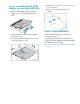
• Align the heatsink to the PCA.
• Secure four heatsink screws in numerical order
as shown.
• Remove the tan liner from the heatsink and
discard.


