
HP Hardware Accelerated Graphics for Desktop Virtualization


Technical white paper | HP Hardware Accelerated Graphics for Desktop Virtualization
5
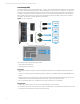
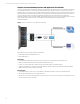
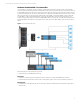
Software Virtualized GPU
Also referred to generically as “Shared GPU”, “API intercept model”, or vendor specific of “vSGA” (VMware), and “vGPU” with
Microsoft Hyper-V RemoteFX. This method uses an API intercept model where the GPU is owned and managed by the
hypervisor and all incoming graphics API requests from the VM’s are intercepted via the API capture driver in the VM and
redirected to and executed by the hypervisor and then sent back to VM (see figure 3). The VM does not have direct access
to the GPU, and the GPU driver is loaded within the hypervisor.
Figure 3. Software Virtualized GPU model
Enterprise Hypervisors and Servers using this technology include:
• Microsoft RemoteFX vGPU
• VMware vSGA
Advantages:
• Scalability of 50+ users per GPU depending on work load
• Can Load balance between multiple installed cards as VM’s start
• Some solutions such as VMware vSGA can dynamically switch between GPU and full software rendering
• Lower cost per user compared to other technologies, with high density of VM’s per GPU
• Allows each user to have power user performance with enhanced support for DirectX 3D and Windows® Aero
• Allows users to have “Just like desktop PC” feel and functionality (Windows Aero)
• Live migration of VM’s with vSGA supported
Disadvantages:
• May be unacceptable performance for high end 3D knowledge or workstation user
• GPU can become a performance bottleneck as many users draw on resource of one card
• Potential application compatibility issues due to limitation of 3D API’s supported
– OpenGL supported versions limited
– DirectX supported versions limited to DirectX 9 in some cases