
HP Hardware Accelerated Graphics for Desktop Virtualization

Technical white paper | HP Hardware Accelerated Graphics for Desktop Virtualization
28
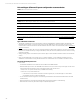
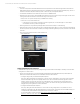
• When connecting to RFX session from RDP 7 RDP client, ensure the following settings are configured:
– Display Tab
• Colors setting set to “Highest Quality (32 bit).”
– Experience Tab
• Connection Speed must be set to “LAN (10 Mb/s or higher).”
• All check boxes should be checked.
Complete the solution with HP Thin Clients
Not that we have moved the workstation into the data center, you need to access it with the appropriate end point client.
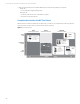
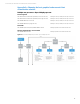
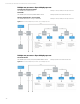
Figure 15 shows an overview of HP’s current thin clients portfolio positioning.
Figure 15. Thin Client Positioning
Zero
(no-OS/single-environment)
Smart
(no-OS/multi-environment)
Flexible
(multi-OS/environment)
Power
user
Knowledge
worker
Task
worker
• HP’s best PCoIP
Performance
• Excellent Security
• Zero Mgmt.
• Dual core CPU
• Peripheral support
• High Density
• Thin and light
• Wireless WAN
• TPM chipset
• Image/data security
• PCIe expansion slot
• Multi-Touch OS
• TPM chipset
• Fiber NIC support
• Core i5
• TPM & Fiber
• AIO and “Puck” form factor
• HW Accelerated Protocols
• Zero Mgmt.
• Power-over-Ethernet (AiO Only)