
HP Hardware Accelerated Graphics for Desktop Virtualization





Technical white paper | HP Hardware Accelerated Graphics for Desktop Virtualization
10
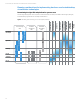
Table 3b. Client OS Support Matrix for WS460c
XP
32
XP
64
Vista
32
Vista
64
Win7
32
Win7
64
Win8
32
Win8
64
Server
2008
R2
Server
2012
RHEL
5
RHEL
6
WS460c G6 Bare Metal
Yes
Yes
Yes
Yes
Yes
Yes
No
No
Yes
**
Yes
**
Yes
Yes
WS460c Gen8 Bare Metal
No
No
No
No
No
Yes
No
No
Yes
**
Yes
**
Yes
Yes
VMware vSGA VM
No
No
No
No
Yes
Yes
Yes
Yes
No
No
No
No
VMware vDGA VM
No
No
No
No
Yes
Yes
Yes
Yes
No
No
Yes
***
Yes
***
Citrix GPU pass-through VM
Yes
Yes
Yes
Yes
Yes
Yes
Yes
Yes
Yes
*
Yes
*
No
***
No
***
True virtual GPU VM
No
No
No
No
Yes
Yes
Yes
Yes
T
BD
T
BD
T
BD
T
BD
* GPU supported referenced in this table refers to Microsoft Hyper-V and Citrix XenApp.
** Server 2012 only supported on WS460c Gen8 when using NVIDIA GRID cards. Windows 2008/2012 Server OS only supported on
WS460c as Hyper-V server.
*** Concerning Linux pass-through GPU support
• VMware only supports vDGA on Linux for DirectPath I/O (GPU compute)
• Citrix does not formally support GPU pass-through on Linux
• Neither VMware View nor Citrix XenDesktop support brokering Linux desktop at this time
XenServer Multi-GPU pass-through considerations
• GPU pass-through technology allows for maximum graphical performance (Workstation grade) as each VM has a
dedicated GPU attached
• XenServer only supports passing through only 1 GPU per VM
• When creating a VM with workstation class graphics performance, you will also need to give it workstation class
resources with at least 2 vCPU and 2–4 Gb memory
• GPU to VM density determined by number of GPUs, this model uses one GPU per VM, no sharing
Citrix XenServer NVIDIA GRID vGPU considerations
• Each physical GPU can be split into 2 or 4 vGPUs
• NVIDIA GRID K1 and K2 cards have multiple GPUs per card: GRID K1 has 4 K600 level GPUs with 16 GB of vRAM and GRID
K2 has 2 K5000 level GPUs with 8 GB of vRAM
• At time of this writing, the predefined GRID vGPU are as follows, only same type vGPUs can be used on the same
physical GPUs (table 4)
Table 4. GRID vGPU types
Card
Physical
GPUs
Virtual GPU
Use
case
Frame
buffer
(MB)
Virtual
display
heads
Maximum
resolution
Maximum vGPUs
per GPU
per Board
GRID K2 2
GRID
K260Q
Typical Designer
2048
4
2560
x 1600
2
4
GRID K2 2
GRID K240Q
Entry
-Level Designer
1024
2
2560 x 1600
4
8
GRID K2 2
GRID K200
Knowledge Work
er
256
2
1920 x 1200
8
16
GRID K1 4
GRID K140Q
Basic Designer
1024
2
2560 x 1600
4
16
GRID K1 4
GRID K100
Knowledge Work
er
256
2
1920
x 1200
8
32
• When creating a VM with workstation class graphics performance, you will also need to give it workstation class
resources with at least 2 vCPU and 2–4 Gb Memory