
HP Graphics Server Blade RedHat Enterprise Linux Quick Start

8
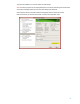
Important Note: For dual display receivers, BOTH displays must have the same resolution and orientation!
It should also be noted that depending on your graphics card being
use, the “ConnectedMonitor” line will have to be modified.
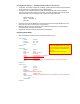
Option "ConnectedMonitor" "DFP-0,DFP-1”
For example, the Quadro 6000 has 3 external outputs, only two can
be used at once. These three external ports are DFP-0 for the DVI-I
connector and DFP-1 & DFP-2 for the display ports.
So a valid options would be:
Option "ConnectedMonitor" "DFP-1,DFP-2”
Creating TwinView Display custom EDID files
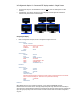
So why do we need the Option “CustomEDID” line in xorg.conf?
Option "CustomEDID" "DFP-0:/etc/X11/lp2465edid.bin; DFP-1:/etc/X11/lp2465edid.bin“
To use DFP we need an EDID file for the nVidia driver. This defines what display resolutions we can support.
If you’re using RGS on a Graphics Server Blade or even a Z-class system without displays attached, you have to
tell the driver what you’re capable of doing. Normally the driver probes the displays for this information but
without them attached, you have to supply the EDID information.
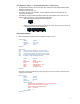
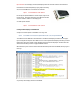
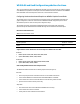
With TwinView, if you do not have monitors attached and do NOT provide the CustomEDID, what do you get in
the X log?
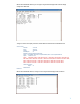
So you end up with a display resolution of 1280x480.